

What is number porting?
Number porting transfers your existing phone number from your current carrier to Allo. Your number stays the same, Allo just becomes your new provider.
Keep your number
No need to update business cards or marketing materials

Customer continuity
Clients keep calling the number they know

Full Allo features
AI summaries, recordings, CRM sync, on your existing number
How porting works
The flow depends on the type of number you’re porting. Pick the matching option below.French, US, and Canadian numbers can be ported directly from the app. Numbers from other countries can very often be ported too, but the process is handled manually: contact support with the number and your current provider, and we’ll take it from there.Leaving instead of arriving? See Port your number out of Allo.
- 🇺🇸 US, Canadian & international numbers
- 🇫🇷 French numbers
Carrier-coordinated porting
For US, Canadian, and other international numbers, Allo coordinates the port with your current carrier on your behalf.1
Start your port in the app
In the Allo app on desktop or web, go to Settings > Numbers and click Port a number, then submit your details. We’ll need information from your current provider, see the checklist below before you start.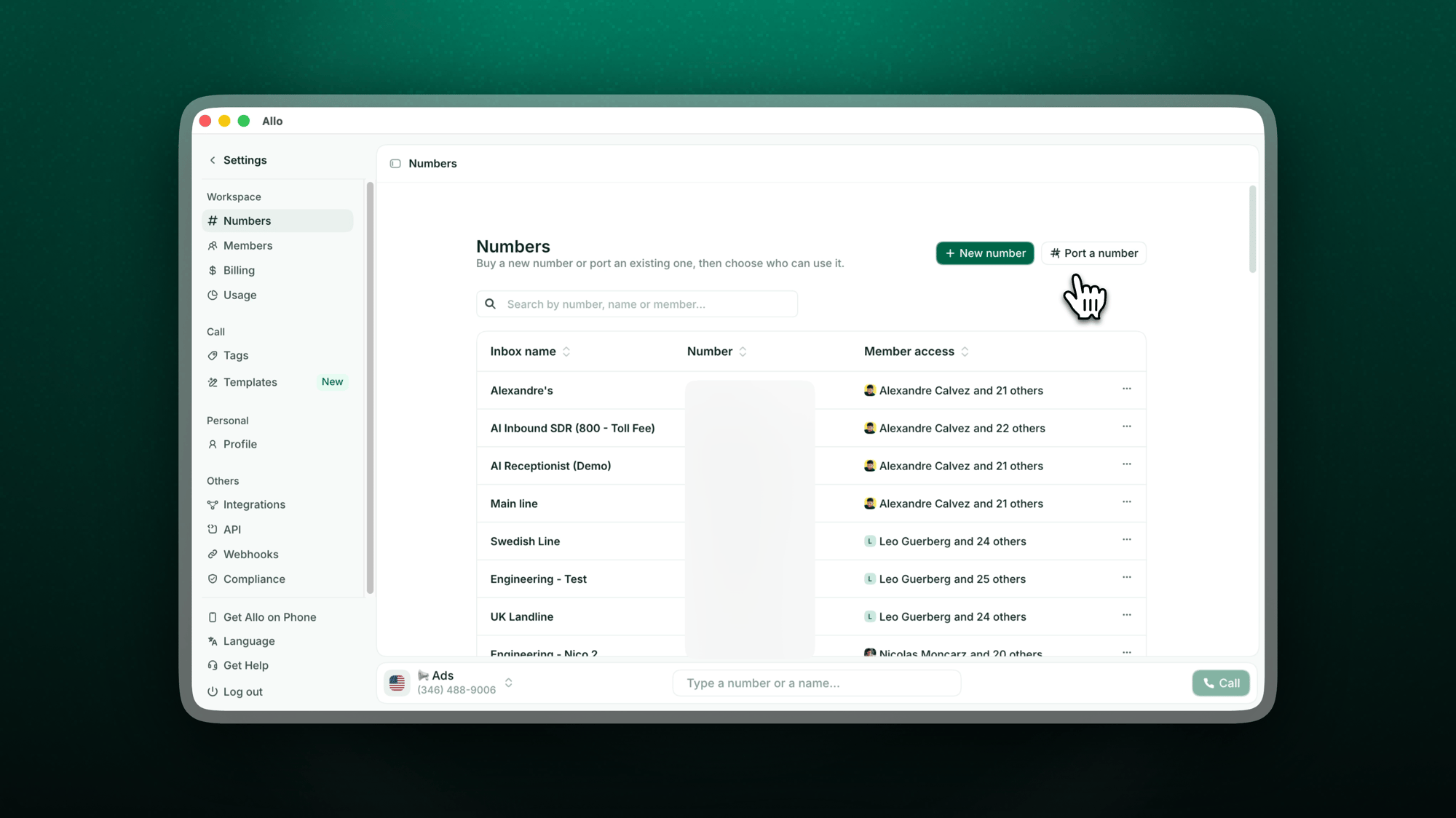
2
We handle everything with your carrier
Our team contacts your current provider and initiates the transfer on your behalf. No calls or paperwork on your side. You’ll get email updates as your port progresses, and you can check the status anytime under Porting orders in Settings > Numbers, see Track your port below.
3
We confirm your porting date
We coordinate the exact transfer date and let you know as soon as it’s confirmed. You can request a preferred date, note it’s not always guaranteed.
4
Prepare 24h before
The day before the transfer, your number appears in your Allo account. Use that window to configure your settings so everything is ready on day one.
5
Activation day
Your number goes live with no downtime. Log in, open and close the app once to make sure everything is working smoothly.
What you’ll need
Before filling out the form, contact your current provider to gather:Track your port
Once your request is submitted, you can follow it without contacting support, through two channels:- By email. We send you an update at every key step, from submission to activation day.
- In the app. Go to Settings > Numbers. Your requests appear at the top of the page under Porting orders, each with its current status and its porting date once scheduled.
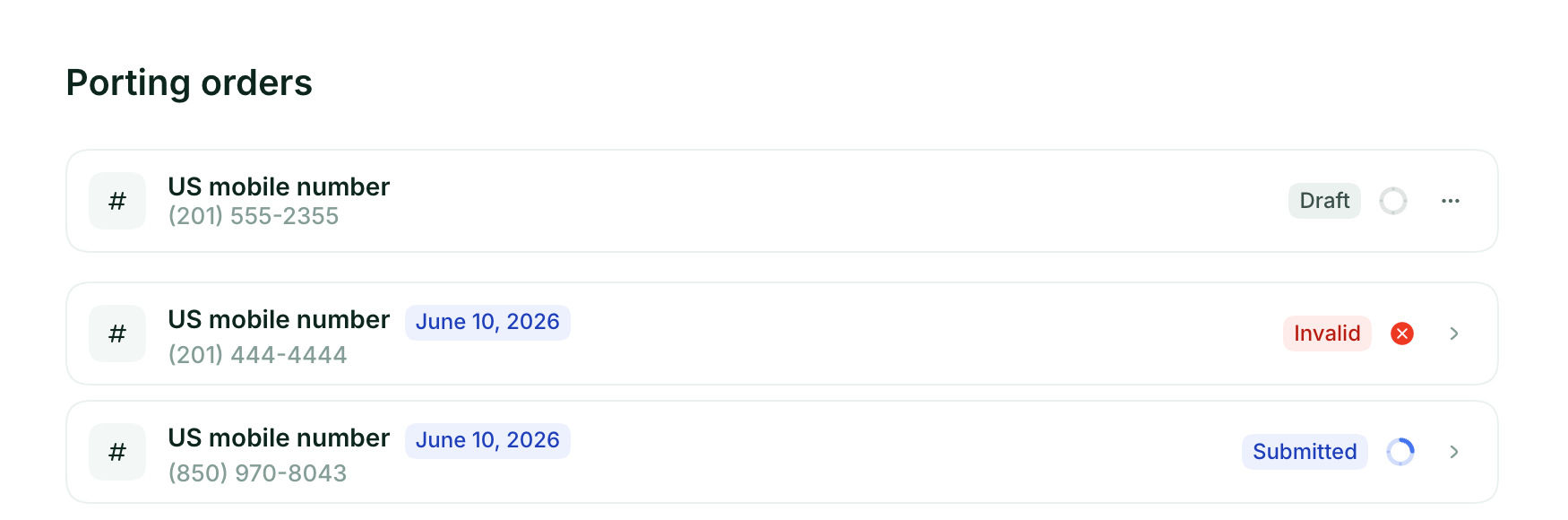
As activation approaches, your number appears in the Numbers list on the same page, ready to configure before going live.
Costs
Allo charges nothing to port your number. Your ported number is included in your existing plan with no extra monthly fee. Your current carrier may charge an early termination or port-out fee, check your contract before initiating. If you already have an Allo number, your ported number either replaces it or becomes an additional number at the standard rate.Eligible numbers
US & Canada. Almost all numbers are portable. We confirm portability within 24 hours of receiving your form. Toll-free. 800, 833, 844, 855, 866, 877, 888 numbers supported. France landlines & mobile (06/07). Eligible for porting. Some VoIP numbers. Porting restrictions vary by provider. Contact us to verify.Timeline
- US & Canada
- France
- By carrier
Mobile numbers: 2–4 business days
Landline numbers: 7–10 business days
Toll-free numbers: 7–14 business days
Landline numbers: 7–10 business days
Toll-free numbers: 7–14 business days
Port from your current carrier
Each carrier has its own steps for releasing your number. Open the section that matches yours.Google Voice (personal / free)
Google Voice (personal / free)

- Your Google account login
- A debit or credit card for the $3 unlock fee
- Account number: your Google account email (for personal/free Voice)
- PIN: your Google Voice voicemail PIN. If you never set one, set or reset it in Voice settings, under Voicemail.
- Fill out the porting form in the app (Settings > Numbers > Port a number)
- Upload your “Number unlocked” screenshot
- Enter your account email as the account number and your voicemail PIN as the port-out PIN
- Keep Google Voice service active until Allo confirms the port is complete
- If the form rejects your PIN, reset your voicemail PIN in Voice and try again
- Texts and voicemails from Google Voice don’t transfer, save anything you need first
Google Voice (Workspace / paid)
Google Voice (Workspace / paid)
- In the Admin console, go to Apps → Google Workspace → Google Voice → Number porting
- Open Port out info and generate your Port-out PIN
- Copy the account number shown for the line and download a recent billing statement
- Submit the porting form in the app (Settings > Numbers > Port a number) with that info. Billing name and address must match Google’s records exactly.
RingCentral
RingCentral

- RingCentral account number (found in your RingCentral admin portal)
- PIN / passcode for that account. RingCentral doesn’t always issue one, if asked, enter
0000 - Physical address where the numbers are registered (no PO Boxes)
- List of numbers to port
RingCentral does not provide a port-out PIN. Enter
0000 if the form asks for one.Grasshopper
Grasshopper

- Account number (often the main number or Customer ID in Grasshopper)
- Billing name and address exactly as on file with Grasshopper
- List of numbers to port
- Grasshopper may require a signed Letter of Authorization (LOA)
Aircall
Aircall

- List of numbers to port
- Billing name, address, and account status as they appear in Aircall
Dialpad
Dialpad

- List of numbers to port
- Current account number (usually 10–16 digits)
- Port-out PIN (4-digit), generated via Dialpad’s port-out page
- Billing name and address exactly matching Dialpad’s record
- Confirm the account is active with no outstanding balance
Quo (formerly OpenPhone)
Quo (formerly OpenPhone)

- Account number (shown in your Quo dashboard under billing/settings)
- Port-out PIN if your Quo account has one set
- Billing name and address as on file with Quo
AT&T, T-Mobile, Verizon, Vonage, Ringover, other carriers
AT&T, T-Mobile, Verizon, Vonage, Ringover, other carriers


- Gather from your carrier: account number, port-out PIN (request one if the carrier uses them), billing name, billing address, most recent invoice
- Submit the porting form in the app (Settings > Numbers > Port a number)
- Wait for confirmation. Timings vary by carrier, see the by-carrier table above
- Cancel your old service only after Allo confirms activation
Limitations to know before porting
Old voicemails and texts don’t transfer. Export anything you need from your previous provider before the cutover. Contacts can be imported into Allo separately. Outgoing SMS can be delayed up to 48 hours during the cutover window as carriers update routing.10DLC & Brand Registration (US numbers)
If your number already has an A2P 10DLC registration with your current provider, it does not transfer to Allo. You’ll need to re-register.- Go to Settings > Register for SMS (10DLC) in your Allo dashboard
- Register your Brand (one-time $24 fee)
- Create a Low Volume campaign once approved
Approval takes 3–7 business days. Start early to avoid any SMS interruption.
Porting a Canadian number? 10DLC only applies when you text US numbers. Messages to Canadian numbers require no registration.
Common issues
My port was rejected
My port was rejected
The most common causes are a name mismatch, wrong account number, outstanding balance, or an active contract. Verify all details match your carrier records exactly, then resubmit.
I can't find my account number
I can't find my account number
Check your most recent carrier bill, log into your carrier’s online account, or call their customer service directly.
My port is taking longer than expected
My port is taking longer than expected
First check the status of your order under Porting orders in Settings > Numbers. If it shows Invalid, open it to fix the flagged information. If the status hasn’t moved in a while, email us at [email protected] and we’ll check with your carrier.
I need to use my number during porting
I need to use my number during porting
You can. Your number stays fully active with your current carrier until cutover day. Most customers experience no service disruption.
Can I port my number back out later?
Can I port my number back out later?
Yes. You’re always in full control of your number and can port it out to another provider at any time.
Will I lose access to my current carrier after porting?
Will I lose access to my current carrier after porting?
Yes. Once the port is complete, your number moves to Allo and your previous carrier’s service for that line ends. This means any plan tied to that number (calls, texts, mobile data) will no longer be active with your old provider.This is standard for any number port between carriers, not specific to Allo.If you’d rather keep your current carrier, you can use call forwarding instead of porting. Call forwarding redirects your incoming calls to your Allo number so you get AI summaries, recordings, and CRM sync, while keeping your existing plan active.Keep in mind that call forwarding only covers incoming calls. You won’t be able to make outbound calls from that number through Allo, and forwarded calls will not appear as outgoing activity in your Allo account. It’s a great option if you want to keep your carrier and still benefit from Allo’s features on calls you receive.
Need help?

Email porting support
Help Center
Browse all support articles
Next steps

Configure features
Set up your ported number with Allo features

Connect CRM
Integrate with your tools

Add team members
Give your team access
Set up AI Receptionist
Configure AI for your number