> ## Documentation Index
> Fetch the complete documentation index at: https://help.withallo.com/llms.txt
> Use this file to discover all available pages before exploring further.
# Port existing number
> Transfer your current phone number to Allo, for free, in a few business days
## What is number porting?
Number porting transfers your existing phone number from your current carrier to Allo. Your number stays the same, Allo just becomes your new provider.
No need to update business cards or marketing materials
Clients keep calling the number they know
AI summaries, recordings, CRM sync, on your existing number
***
## How porting works
The flow depends on the type of number you're porting. Pick the matching option below.
## Carrier-coordinated porting
For US, Canadian, and other international numbers, Allo coordinates the port with your current carrier on your behalf.
In the Allo app on desktop or web, go to [**Settings > Numbers**](https://web.withallo.com/settings/numbers) and click **Port a number**, then submit your details. We'll need information from your current provider, see the checklist below before you start.
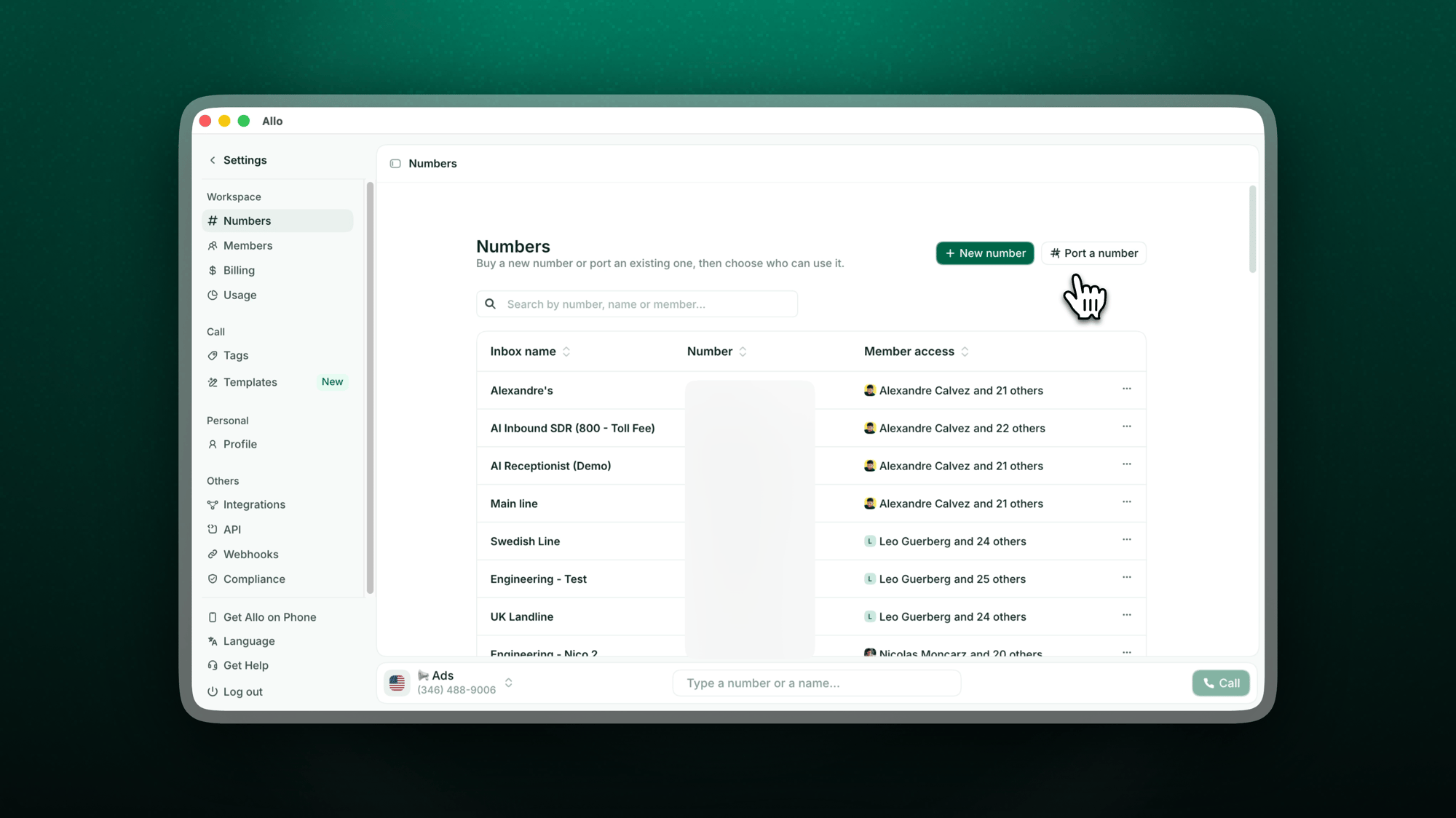 Our team contacts your current provider and initiates the transfer on your behalf. No calls or paperwork on your side. You'll get email updates as your port progresses, and you can check the status anytime under **Porting orders** in [Settings > Numbers](https://web.withallo.com/settings/numbers), see [Track your port](#track-your-port) below.
We coordinate the exact transfer date and let you know as soon as it's confirmed. You can request a preferred date, note it's not always guaranteed.
The day before the transfer, your number appears in your Allo account. Use that window to configure your settings so everything is ready on day one.
Your number goes live with no downtime. Log in, open and close the app once to make sure everything is working smoothly.
**Do not cancel your current service** until the porting is complete. Your number must stay active with your old provider for the transfer to succeed. Cancelling early releases the number and breaks the port.
### What you'll need
Before filling out the form, contact your current provider to gather:
| Information | Where to find it |
| -------------------------- | ------------------------------------------------------------------------ |
| **Account number** | Your carrier bill or online account |
| **Authorized person name** | Must match the name on the billing contract exactly |
| **Billing phone number** | On file with your current carrier |
| **Service address** | Zip code and state are required |
| **Port-out PIN** | Request it from your carrier, not always required, but avoids rejections |
| **Last invoice** | A copy of your most recent bill |
The most common reason for a rejected port is a **name mismatch**. Make sure the authorized person name matches your carrier contract exactly.
## In-app self-serve porting
Porting a French number (landline or 06/07 mobile) happens directly inside Allo, no external form needed.
In the Allo app on desktop or web, go to [**Settings > Numbers**](https://web.withallo.com/settings/numbers).
Start a new porting request from the Numbers screen.
Add the phone number or numbers you want to bring over. The order may be split into separate requests depending on the carrier and the type of number (landline vs mobile).
Fill in the requested information (RIO code, account holder, etc.) and pick the porting date you'd like.
You can set up business hours, IVR, AI Receptionist, and routing right away. Everything is ready to go on activation day. In the meantime, we email you updates on your port's progress, and you can check the status anytime under **Porting orders** in [Settings > Numbers](https://web.withallo.com/settings/numbers), see [Track your port](#track-your-port) below.
You'll receive an email confirmation on the date you selected, and your number is live in Allo.
### Timeline
* **Mobile (06/07):** around 1 week
* **Landline:** 10 to 15 business days
**Do not cancel your current service** before the porting completes. Your number must stay active with your old provider for the transfer to succeed. Cancelling early releases the number and breaks the port.
***
## Track your port
Once your request is submitted, you can follow it without contacting support, through two channels:
* **By email.** We send you an update at every key step, from submission to activation day.
* **In the app.** Go to [**Settings > Numbers**](https://web.withallo.com/settings/numbers). Your requests appear at the top of the page under **Porting orders**, each with its current status and its porting date once scheduled.
Our team contacts your current provider and initiates the transfer on your behalf. No calls or paperwork on your side. You'll get email updates as your port progresses, and you can check the status anytime under **Porting orders** in [Settings > Numbers](https://web.withallo.com/settings/numbers), see [Track your port](#track-your-port) below.
We coordinate the exact transfer date and let you know as soon as it's confirmed. You can request a preferred date, note it's not always guaranteed.
The day before the transfer, your number appears in your Allo account. Use that window to configure your settings so everything is ready on day one.
Your number goes live with no downtime. Log in, open and close the app once to make sure everything is working smoothly.
**Do not cancel your current service** until the porting is complete. Your number must stay active with your old provider for the transfer to succeed. Cancelling early releases the number and breaks the port.
### What you'll need
Before filling out the form, contact your current provider to gather:
| Information | Where to find it |
| -------------------------- | ------------------------------------------------------------------------ |
| **Account number** | Your carrier bill or online account |
| **Authorized person name** | Must match the name on the billing contract exactly |
| **Billing phone number** | On file with your current carrier |
| **Service address** | Zip code and state are required |
| **Port-out PIN** | Request it from your carrier, not always required, but avoids rejections |
| **Last invoice** | A copy of your most recent bill |
The most common reason for a rejected port is a **name mismatch**. Make sure the authorized person name matches your carrier contract exactly.
## In-app self-serve porting
Porting a French number (landline or 06/07 mobile) happens directly inside Allo, no external form needed.
In the Allo app on desktop or web, go to [**Settings > Numbers**](https://web.withallo.com/settings/numbers).
Start a new porting request from the Numbers screen.
Add the phone number or numbers you want to bring over. The order may be split into separate requests depending on the carrier and the type of number (landline vs mobile).
Fill in the requested information (RIO code, account holder, etc.) and pick the porting date you'd like.
You can set up business hours, IVR, AI Receptionist, and routing right away. Everything is ready to go on activation day. In the meantime, we email you updates on your port's progress, and you can check the status anytime under **Porting orders** in [Settings > Numbers](https://web.withallo.com/settings/numbers), see [Track your port](#track-your-port) below.
You'll receive an email confirmation on the date you selected, and your number is live in Allo.
### Timeline
* **Mobile (06/07):** around 1 week
* **Landline:** 10 to 15 business days
**Do not cancel your current service** before the porting completes. Your number must stay active with your old provider for the transfer to succeed. Cancelling early releases the number and breaks the port.
***
## Track your port
Once your request is submitted, you can follow it without contacting support, through two channels:
* **By email.** We send you an update at every key step, from submission to activation day.
* **In the app.** Go to [**Settings > Numbers**](https://web.withallo.com/settings/numbers). Your requests appear at the top of the page under **Porting orders**, each with its current status and its porting date once scheduled.
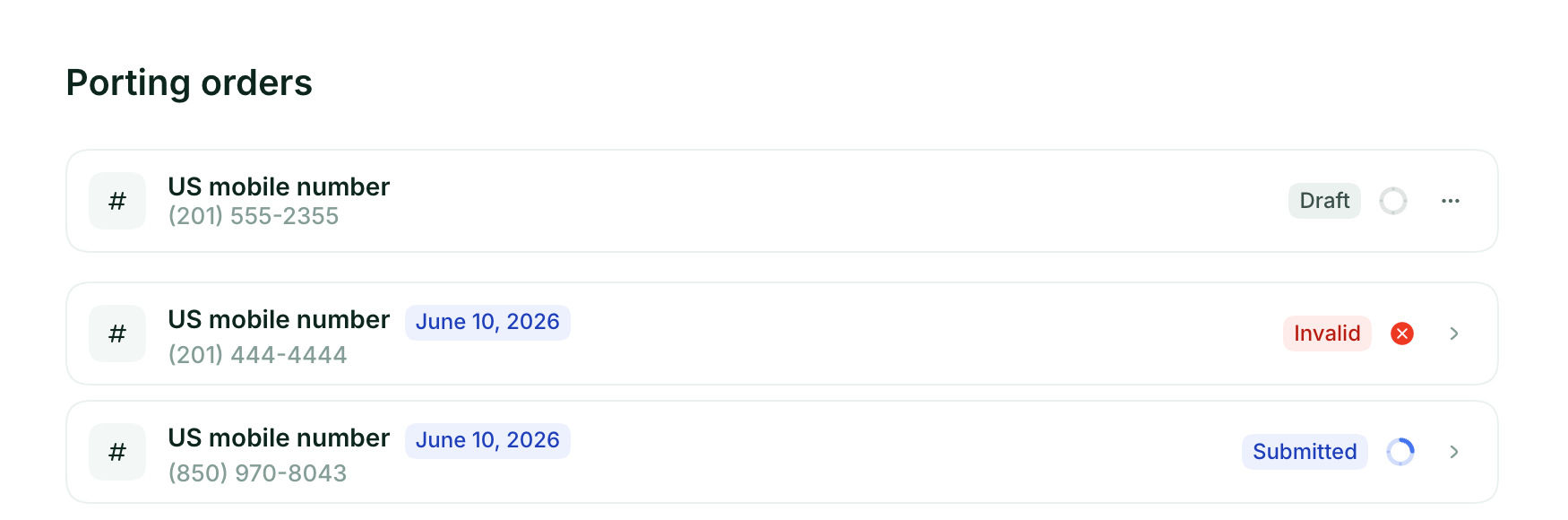 | Status | What it means |
| ------------- | ------------------------------------------------------------------------------------------------------------------------------------------------------------------------------------- |
| **Draft** | Your request is started but not submitted yet. Open it to complete the missing information and submit. |
| **Submitted** | Your request has been sent and the port is in progress. Nothing to do, we'll email you at each step. |
| **Invalid** | Something in your request needs to be corrected. Open the order to review the details, fix the information, and resubmit. A name or account number mismatch is the most common cause. |
As activation approaches, your number appears in the **Numbers** list on the same page, ready to configure before going live.
***
## Costs
**Allo charges nothing to port your number.** Your ported number is included in your existing plan with no extra monthly fee.
Your current carrier may charge an early termination or port-out fee, check your contract before initiating.
**If you already have an Allo number**, your ported number either replaces it or becomes an additional number at the standard rate.
***
## Eligible numbers
**US & Canada.** Almost all numbers are portable. We confirm portability within **24 hours** of receiving your form.
**Toll-free.** 800, 833, 844, 855, 866, 877, 888 numbers supported.
**France landlines & mobile (06/07).** Eligible for porting.
**Some VoIP numbers.** Porting restrictions vary by provider. Contact us to verify.
***
## Timeline
Mobile numbers: 2–4 business days\
Landline numbers: 7–10 business days\
Toll-free numbers: 7–14 business days
Mobile numbers: around 1 week\
Landline numbers: 10–15 business days
| Carrier | Estimated time |
| ------------------------ | ------------------------------------------------------------ |
| AT\&T | Mobile: minutes to 5 days / Landline: 5–7 days |
| T-Mobile | Mobile: 10 minutes to 3 hours / Landline: 3–10 days |
| Google Voice | Calls: up to 48h / Texts: up to 3 days |
| RingCentral | Mobile: 5–10 days / Landline: 7–15 days |
| Grasshopper | Up to 2 weeks |
| Aircall | 5–10 business days |
| Dialpad | 5–10 business days |
| Vonage | 5–21 business days |
| Ringover | Local: 5–10 days / International or toll-free: up to 15 days |
| Quo (formerly OpenPhone) | US: 5–7 days / Canada: 10–12 days |
***
## Port from your current carrier
Each carrier has its own steps for releasing your number. Open the section that matches yours.
| Status | What it means |
| ------------- | ------------------------------------------------------------------------------------------------------------------------------------------------------------------------------------- |
| **Draft** | Your request is started but not submitted yet. Open it to complete the missing information and submit. |
| **Submitted** | Your request has been sent and the port is in progress. Nothing to do, we'll email you at each step. |
| **Invalid** | Something in your request needs to be corrected. Open the order to review the details, fix the information, and resubmit. A name or account number mismatch is the most common cause. |
As activation approaches, your number appears in the **Numbers** list on the same page, ready to configure before going live.
***
## Costs
**Allo charges nothing to port your number.** Your ported number is included in your existing plan with no extra monthly fee.
Your current carrier may charge an early termination or port-out fee, check your contract before initiating.
**If you already have an Allo number**, your ported number either replaces it or becomes an additional number at the standard rate.
***
## Eligible numbers
**US & Canada.** Almost all numbers are portable. We confirm portability within **24 hours** of receiving your form.
**Toll-free.** 800, 833, 844, 855, 866, 877, 888 numbers supported.
**France landlines & mobile (06/07).** Eligible for porting.
**Some VoIP numbers.** Porting restrictions vary by provider. Contact us to verify.
***
## Timeline
Mobile numbers: 2–4 business days\
Landline numbers: 7–10 business days\
Toll-free numbers: 7–14 business days
Mobile numbers: around 1 week\
Landline numbers: 10–15 business days
| Carrier | Estimated time |
| ------------------------ | ------------------------------------------------------------ |
| AT\&T | Mobile: minutes to 5 days / Landline: 5–7 days |
| T-Mobile | Mobile: 10 minutes to 3 hours / Landline: 3–10 days |
| Google Voice | Calls: up to 48h / Texts: up to 3 days |
| RingCentral | Mobile: 5–10 days / Landline: 7–15 days |
| Grasshopper | Up to 2 weeks |
| Aircall | 5–10 business days |
| Dialpad | 5–10 business days |
| Vonage | 5–21 business days |
| Ringover | Local: 5–10 days / International or toll-free: up to 15 days |
| Quo (formerly OpenPhone) | US: 5–7 days / Canada: 10–12 days |
***
## Port from your current carrier
Each carrier has its own steps for releasing your number. Open the section that matches yours.
 Google Voice requires you to **unlock your number** first. It costs **\$3 USD** (one-time), paid to Google.
**What you'll need**
* Your Google account login
* A debit or credit card for the \$3 unlock fee
**Step 1: Open the unlock page**
On your computer, open [Google Voice](https://voice.google.com/). At the top right, click **Settings > Settings**, then go to the **Account** section. If you have multiple Voice numbers, pick the one you want to move.
**Step 2: Click "Unlock my number"**
Under the Google Voice number you want to port out, click **Unlock**.
**Step 3: Pay the unlock fee**
Complete the \$3 payment with your Google account. You'll see a confirmation and receive a receipt by email. **Keep a screenshot of the page showing "Number unlocked."**
**Step 4: Note your account info**
* **Account number:** your Google account email (for personal/free Voice)
* **PIN:** your Google Voice voicemail PIN. If you never set one, set or reset it in Voice settings, under Voicemail.
**Step 5: Submit the port to Allo**
* Fill out the porting form in the app (**Settings > Numbers > Port a number**)
* Upload your "Number unlocked" screenshot
* Enter your account email as the account number and your voicemail PIN as the port-out PIN
**Tips**
* Keep Google Voice service active until Allo confirms the port is complete
* If the form rejects your PIN, reset your voicemail PIN in Voice and try again
* Texts and voicemails from Google Voice don't transfer, save anything you need first
For Google Workspace admins transferring a paid Voice number:
1. In the Admin console, go to **Apps → Google Workspace → Google Voice → Number porting**
2. Open **Port out info** and generate your **Port-out PIN**
3. Copy the **account number** shown for the line and download a recent **billing statement**
4. Submit the porting form in the app (**Settings > Numbers > Port a number**) with that info. Billing name and address must match Google's records exactly.
Keep Google Voice active until Allo confirms completion.
Google Voice requires you to **unlock your number** first. It costs **\$3 USD** (one-time), paid to Google.
**What you'll need**
* Your Google account login
* A debit or credit card for the \$3 unlock fee
**Step 1: Open the unlock page**
On your computer, open [Google Voice](https://voice.google.com/). At the top right, click **Settings > Settings**, then go to the **Account** section. If you have multiple Voice numbers, pick the one you want to move.
**Step 2: Click "Unlock my number"**
Under the Google Voice number you want to port out, click **Unlock**.
**Step 3: Pay the unlock fee**
Complete the \$3 payment with your Google account. You'll see a confirmation and receive a receipt by email. **Keep a screenshot of the page showing "Number unlocked."**
**Step 4: Note your account info**
* **Account number:** your Google account email (for personal/free Voice)
* **PIN:** your Google Voice voicemail PIN. If you never set one, set or reset it in Voice settings, under Voicemail.
**Step 5: Submit the port to Allo**
* Fill out the porting form in the app (**Settings > Numbers > Port a number**)
* Upload your "Number unlocked" screenshot
* Enter your account email as the account number and your voicemail PIN as the port-out PIN
**Tips**
* Keep Google Voice service active until Allo confirms the port is complete
* If the form rejects your PIN, reset your voicemail PIN in Voice and try again
* Texts and voicemails from Google Voice don't transfer, save anything you need first
For Google Workspace admins transferring a paid Voice number:
1. In the Admin console, go to **Apps → Google Workspace → Google Voice → Number porting**
2. Open **Port out info** and generate your **Port-out PIN**
3. Copy the **account number** shown for the line and download a recent **billing statement**
4. Submit the porting form in the app (**Settings > Numbers > Port a number**) with that info. Billing name and address must match Google's records exactly.
Keep Google Voice active until Allo confirms completion.
 **Step 1: Gather the required info**
* **RingCentral account number** (found in your RingCentral admin portal)
* **PIN / passcode** for that account. RingCentral doesn't always issue one, if asked, enter `0000`
* **Physical address** where the numbers are registered (no PO Boxes)
* **List of numbers** to port
**Step 2: Submit your request**
Fill out the porting form in the app (**Settings > Numbers > Port a number**). RingCentral's role is to cooperate once Allo initiates the port.
**Step 3: Monitor status**
Typical US local numbers take **5–10 business days**. Landlines or toll-free can take longer.
**Step 4: Cancel RingCentral after the port completes**
Only cancel your RingCentral service after Allo confirms your number is live. Cancelling earlier can result in losing the number.
RingCentral does not provide a port-out PIN. Enter `0000` if the form asks for one.
**Step 1: Gather the required info**
* **RingCentral account number** (found in your RingCentral admin portal)
* **PIN / passcode** for that account. RingCentral doesn't always issue one, if asked, enter `0000`
* **Physical address** where the numbers are registered (no PO Boxes)
* **List of numbers** to port
**Step 2: Submit your request**
Fill out the porting form in the app (**Settings > Numbers > Port a number**). RingCentral's role is to cooperate once Allo initiates the port.
**Step 3: Monitor status**
Typical US local numbers take **5–10 business days**. Landlines or toll-free can take longer.
**Step 4: Cancel RingCentral after the port completes**
Only cancel your RingCentral service after Allo confirms your number is live. Cancelling earlier can result in losing the number.
RingCentral does not provide a port-out PIN. Enter `0000` if the form asks for one.
 **Step 1: Keep your Grasshopper account active**
Make sure your account is in good standing. Do not cancel before the port is finished.
**Step 2: Prepare the required info**
* **Account number** (often the main number or Customer ID in Grasshopper)
* **Billing name and address** exactly as on file with Grasshopper
* **List of numbers** to port
* Grasshopper may require a signed **Letter of Authorization (LOA)**
**Step 3: Submit your request**
Fill out the porting form in the app (**Settings > Numbers > Port a number**) with all required documents.
**Step 4: Wait for confirmation**
Typical timelines: local numbers **2–5 business days**, toll-free **5–10 business days**.
**Step 5: Cancel Grasshopper**
Once your number is live in Allo, cancel Grasshopper. Not before.
**Step 1: Keep your Grasshopper account active**
Make sure your account is in good standing. Do not cancel before the port is finished.
**Step 2: Prepare the required info**
* **Account number** (often the main number or Customer ID in Grasshopper)
* **Billing name and address** exactly as on file with Grasshopper
* **List of numbers** to port
* Grasshopper may require a signed **Letter of Authorization (LOA)**
**Step 3: Submit your request**
Fill out the porting form in the app (**Settings > Numbers > Port a number**) with all required documents.
**Step 4: Wait for confirmation**
Typical timelines: local numbers **2–5 business days**, toll-free **5–10 business days**.
**Step 5: Cancel Grasshopper**
Once your number is live in Allo, cancel Grasshopper. Not before.
 **Step 1: Check eligibility**
Confirm your number is portable and that your Aircall account is active.
**Step 2: Collect the required details**
* **List of numbers** to port
* **Billing name, address, and account status** as they appear in Aircall
**Step 3: Submit your request**
Fill out the porting form in the app (**Settings > Numbers > Port a number**). Provide the collected info and any Letter of Authorization if required.
**Step 4: Keep Aircall active** until the port completes
**Step 5: Cancel Aircall after confirmation**
For carrier-side details, see [Aircall's port-out guide](https://support.aircall.io/en-gb/articles/10375397110301).
**Step 1: Check eligibility**
Confirm your number is portable and that your Aircall account is active.
**Step 2: Collect the required details**
* **List of numbers** to port
* **Billing name, address, and account status** as they appear in Aircall
**Step 3: Submit your request**
Fill out the porting form in the app (**Settings > Numbers > Port a number**). Provide the collected info and any Letter of Authorization if required.
**Step 4: Keep Aircall active** until the port completes
**Step 5: Cancel Aircall after confirmation**
For carrier-side details, see [Aircall's port-out guide](https://support.aircall.io/en-gb/articles/10375397110301).
 **Step 1: Start a port request in Dialpad**
In Dialpad admin, navigate to **Admin Settings → Office → Number Porting → Start a New Port Request**.
**Step 2: Gather the required items**
* **List of numbers** to port
* **Current account number** (usually 10–16 digits)
* **Port-out PIN** (4-digit), generated via Dialpad's port-out page
* **Billing name and address** exactly matching Dialpad's record
* Confirm the account is active with no outstanding balance
**Step 3: Submit to Allo**
Fill out the porting form in the app (**Settings > Numbers > Port a number**). Attach any LOA or documentation if required.
**Step 4: Monitor the process**
Timelines can go up to around **15 business days**.
**Step 5: Cancel Dialpad** after Allo confirms the port.
**Step 1: Start a port request in Dialpad**
In Dialpad admin, navigate to **Admin Settings → Office → Number Porting → Start a New Port Request**.
**Step 2: Gather the required items**
* **List of numbers** to port
* **Current account number** (usually 10–16 digits)
* **Port-out PIN** (4-digit), generated via Dialpad's port-out page
* **Billing name and address** exactly matching Dialpad's record
* Confirm the account is active with no outstanding balance
**Step 3: Submit to Allo**
Fill out the porting form in the app (**Settings > Numbers > Port a number**). Attach any LOA or documentation if required.
**Step 4: Monitor the process**
Timelines can go up to around **15 business days**.
**Step 5: Cancel Dialpad** after Allo confirms the port.
 **Step 1: Get your account info from Quo**
* Account number (shown in your Quo dashboard under billing/settings)
* Port-out PIN if your Quo account has one set
* Billing name and address as on file with Quo
**Step 2: Submit your request**
Fill out the porting form in the app (**Settings > Numbers > Port a number**) with your numbers and account details.
**Step 3: Wait for confirmation**
Typical timelines: **US 5–7 business days, Canada 10–12 business days**.
**Step 4: Cancel Quo** only after Allo confirms your number is live.
**Step 1: Get your account info from Quo**
* Account number (shown in your Quo dashboard under billing/settings)
* Port-out PIN if your Quo account has one set
* Billing name and address as on file with Quo
**Step 2: Submit your request**
Fill out the porting form in the app (**Settings > Numbers > Port a number**) with your numbers and account details.
**Step 3: Wait for confirmation**
Typical timelines: **US 5–7 business days, Canada 10–12 business days**.
**Step 4: Cancel Quo** only after Allo confirms your number is live.


 The general process is the same for any US, Canadian, or international carrier:
1. **Gather from your carrier:** account number, port-out PIN (request one if the carrier uses them), billing name, billing address, most recent invoice
2. **Submit** the porting form in the app (**Settings > Numbers > Port a number**)
3. **Wait for confirmation.** Timings vary by carrier, see the by-carrier table above
4. **Cancel your old service** only after Allo confirms activation
Don't see your carrier listed? We port from most providers worldwide. Email [porting@withallo.com](mailto:porting@withallo.com) and we'll confirm eligibility and timelines.
***
## Limitations to know before porting
**Allo numbers cannot receive OTP (One-Time Password) messages.** If your number is currently used for two-factor authentication with banks, WhatsApp, Uber, Airbnb, or similar services, keep a separate number active for that purpose. This limitation applies to most virtual and VoIP services.
**Old voicemails and texts don't transfer.** Export anything you need from your previous provider before the cutover. Contacts can be imported into Allo separately.
**Outgoing SMS can be delayed up to 48 hours** during the cutover window as carriers update routing.
***
## 10DLC & Brand Registration (US numbers)
If your number already has an A2P 10DLC registration with your current provider, **it does not transfer to Allo**. You'll need to re-register.
1. Go to **Settings > Compliance** in your Allo dashboard
2. Register your Brand (one-time \$24 fee)
3. Create a Low Volume campaign once approved
Approval takes 3–7 business days. Start early to avoid any SMS interruption.
***
## Common issues
The most common causes are a name mismatch, wrong account number, outstanding balance, or an active contract. Verify all details match your carrier records exactly, then resubmit.
Check your most recent carrier bill, log into your carrier's online account, or call their customer service directly.
First check the status of your order under **Porting orders** in [Settings > Numbers](https://web.withallo.com/settings/numbers). If it shows **Invalid**, open it to fix the flagged information. If the status hasn't moved in a while, email us at **[porting@withallo.com](mailto:porting@withallo.com)** and we'll check with your carrier.
You can. Your number stays fully active with your current carrier until cutover day. Most customers experience no service disruption.
Yes. You're always in full control of your number and can port it out to another provider at any time.
Yes. Once the port is complete, your number moves to Allo and your previous carrier's service for that line ends. This means any plan tied to that number (calls, texts, mobile data) will no longer be active with your old provider.
This is standard for any number port between carriers, not specific to Allo.
**If you'd rather keep your current carrier**, you can use [call forwarding](/en/phone-numbers/connect-personal-number) instead of porting. Call forwarding redirects your incoming calls to your Allo number so you get AI summaries, recordings, and CRM sync, while keeping your existing plan active.
Keep in mind that call forwarding only covers **incoming calls**. You won't be able to make outbound calls from that number through Allo, and forwarded calls will not appear as outgoing activity in your Allo account. It's a great option if you want to keep your carrier and still benefit from Allo's features on calls you receive.
***
## Need help?
[porting@withallo.com](mailto:porting@withallo.com)
Browse all support articles
***
## Next steps
Set up your ported number with Allo features
Integrate with your tools
Give your team access
Configure AI for your number
The general process is the same for any US, Canadian, or international carrier:
1. **Gather from your carrier:** account number, port-out PIN (request one if the carrier uses them), billing name, billing address, most recent invoice
2. **Submit** the porting form in the app (**Settings > Numbers > Port a number**)
3. **Wait for confirmation.** Timings vary by carrier, see the by-carrier table above
4. **Cancel your old service** only after Allo confirms activation
Don't see your carrier listed? We port from most providers worldwide. Email [porting@withallo.com](mailto:porting@withallo.com) and we'll confirm eligibility and timelines.
***
## Limitations to know before porting
**Allo numbers cannot receive OTP (One-Time Password) messages.** If your number is currently used for two-factor authentication with banks, WhatsApp, Uber, Airbnb, or similar services, keep a separate number active for that purpose. This limitation applies to most virtual and VoIP services.
**Old voicemails and texts don't transfer.** Export anything you need from your previous provider before the cutover. Contacts can be imported into Allo separately.
**Outgoing SMS can be delayed up to 48 hours** during the cutover window as carriers update routing.
***
## 10DLC & Brand Registration (US numbers)
If your number already has an A2P 10DLC registration with your current provider, **it does not transfer to Allo**. You'll need to re-register.
1. Go to **Settings > Compliance** in your Allo dashboard
2. Register your Brand (one-time \$24 fee)
3. Create a Low Volume campaign once approved
Approval takes 3–7 business days. Start early to avoid any SMS interruption.
***
## Common issues
The most common causes are a name mismatch, wrong account number, outstanding balance, or an active contract. Verify all details match your carrier records exactly, then resubmit.
Check your most recent carrier bill, log into your carrier's online account, or call their customer service directly.
First check the status of your order under **Porting orders** in [Settings > Numbers](https://web.withallo.com/settings/numbers). If it shows **Invalid**, open it to fix the flagged information. If the status hasn't moved in a while, email us at **[porting@withallo.com](mailto:porting@withallo.com)** and we'll check with your carrier.
You can. Your number stays fully active with your current carrier until cutover day. Most customers experience no service disruption.
Yes. You're always in full control of your number and can port it out to another provider at any time.
Yes. Once the port is complete, your number moves to Allo and your previous carrier's service for that line ends. This means any plan tied to that number (calls, texts, mobile data) will no longer be active with your old provider.
This is standard for any number port between carriers, not specific to Allo.
**If you'd rather keep your current carrier**, you can use [call forwarding](/en/phone-numbers/connect-personal-number) instead of porting. Call forwarding redirects your incoming calls to your Allo number so you get AI summaries, recordings, and CRM sync, while keeping your existing plan active.
Keep in mind that call forwarding only covers **incoming calls**. You won't be able to make outbound calls from that number through Allo, and forwarded calls will not appear as outgoing activity in your Allo account. It's a great option if you want to keep your carrier and still benefit from Allo's features on calls you receive.
***
## Need help?
[porting@withallo.com](mailto:porting@withallo.com)
Browse all support articles
***
## Next steps
Set up your ported number with Allo features
Integrate with your tools
Give your team access
Configure AI for your number